

Advertisement
Manage your account on the go
Check your data usage and balance
Refill your plan anytime
anywhere
"My Total Wireless: Account App" is a convenient mobile application that allows users to manage their Total Wireless accounts with ease. Stay on top of your data usage, refill your plan, and access customer support all in one place.
Advertisement

All link sources on this site are jumped to App Store, Google Play and other official platforms. No virus, no malware.
Select a versionMy Total Wireless: Account App is the ultimate companion for Total Wireless users, providing a convenient and easy way to manage your account right from your mobile device. With this app, you can take control of your Total Wireless account anytime, anywhere, ensuring that you stay connected and in control of your wireless services.
Key features of the My Total Wireless: Account App include:
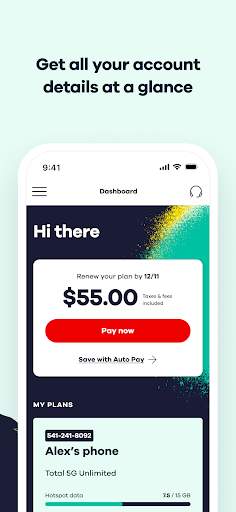
1. Account Management: Easily manage your Total Wireless account directly from the app. View your account details, check your usage, add or remove services, and update your personal information with just a few taps.
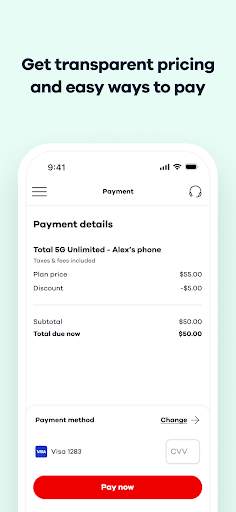
2. Bill Payment: Pay your Total Wireless bill quickly and securely through the app. Set up automatic payments, view your billing history, and receive notifications when your bill is due to ensure you never miss a payment.
3. Data Usage Monitoring: Keep track of your data usage in real-time to avoid overage charges. The app allows you to monitor your data usage, set usage alerts, and adjust your plan as needed to stay within your data limits.
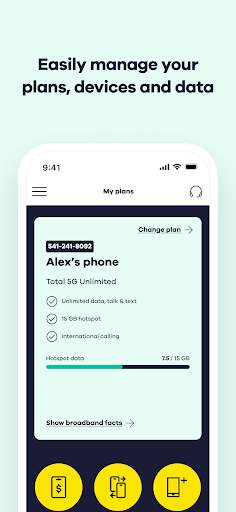
4. Plan Management: Easily switch between Total Wireless plans, upgrade or downgrade your current plan, and add data or international features to customize your wireless experience based on your needs.
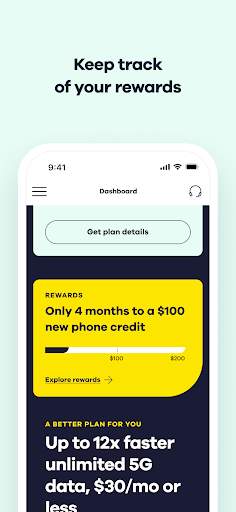
5. Rewards and Promotions: Stay informed about the latest Total Wireless promotions, discounts, and rewards programs through the app. Take advantage of exclusive offers and deals to maximize your savings and get the most out of your wireless service.
6. Customer Support: Access customer support directly from the app for any questions, issues, or concerns you may have regarding your Total Wireless account. Get help from knowledgeable representatives to resolve any issues quickly and efficiently.
7. Account Security: Rest assured that your personal and account information is secure with the My Total Wireless: Account App. The app uses advanced security measures to protect your data and ensure a safe and reliable user experience.
Whether you are a new Total Wireless customer or a long-time user, the My Total Wireless: Account App is your one-stop solution for managing your account with ease and convenience. Download the app today to streamline your Total Wireless experience and enjoy seamless access to your account whenever and wherever you need it. Stay connected, stay in control, and make the most of your Total Wireless services with the My Total Wireless: Account App.
Ensure your device is compatible with the My Total Wireless: Account App.
The app is compatible with both Android and iOS devices.
For best performance, make sure your device is running the latest version of its operating system.
Please note that performance may vary based on device specifications and network conditions.
Understand the permissions required by the My Total Wireless: Account App.
The app requires access to your device's location, camera, and storage. These permissions are necessary for features such as locating nearby stores, scanning QR codes, and saving account information.
These permissions are used solely to enhance your experience and provide you with the full functionality of the app.
Stay up to date with the latest features and improvements in the My Total Wireless: Account App.
Added new security features to protect your account information.
Improved user interface for easier navigation.
Fixed bugs and enhanced app performance for a smoother experience.
A: You can log in to My Total Wireless: Account App using your username and password.
A: You can check your account balance on My Total Wireless: Account App by navigating to the 'Account' section.
A: Yes, you can make a payment through My Total Wireless: Account App using the payment options provided.
A: You can view your data usage on My Total Wireless: Account App by going to the 'Usage' section.
A: Yes, you can manage multiple Total Wireless accounts on My Total Wireless: Account App by adding them to your profile.





